New on Twitter? Tips and Hints
*pats on head* so cute, with their little anxious yet eager faces. Will anyone talk to them? Will they make new friends? Will they make an ass of themselves? Anyway some tips – you might want to do these step by step. I wrote them that way: What is Twitter: Twitter is a place for…
*pats on head* so cute, with their little anxious yet eager faces. Will anyone talk to them? Will they make new friends? Will they make an ass of themselves?
Anyway some tips – you might want to do these step by step. I wrote them that way:
- What is Twitter: Twitter is a place for testimonials (status updates about themselves “I am shopping”). No response required.
- What is Twitter: Twitter is a place for distribution of information (links to others “here’s a cool blog post http://tinyurl.com”) – also automated bots e.g. @ABCNews
- What is Twitter: Twitter is the place for conversation (send replies to others “@silkcharm that was a wonderful tweet!) Heh.

- Fill in your profile. BEFORE you offer friendship. We judge whether to follow you back based on your location, your avatar, your bio, and the first few tweets you do. (more info on Twitter Reputation management)
- Add only a few people at first – add friends that will listen. How did you find out about Twitter? Add that person, then tell them (@silkcharm I read your blog post now I’m on Twitter! yay!) we’ll message you back and applaud your bravery. Well, I will anyway.
- Once you’ve messaged a few times – not ads, not links to your blog, read TwitterAgency as it has been set up to explain “How Not To Be Crap On Twitter”
THEN start to add strangers –but please don’t DM (direct message) or open tweet them to say thanks if they add you back. That’s just downright creepy – we aren’t in a relationship yet, we are ‘just in a bar’ together. - Search (click Find Friends at top of Twitter page) and put in your keywords. “Social Media” will return a tonne of ‘consultants’. “World of Warcraft” will give you a list of the coolest people on Twitter. Or at least, in my opinion. Add people that have your hobbies as well as your industry. That will keep you engaged and entertained. And we like people who are immersed better than observers.
- Bookmark Summize – or Search – once you’ve done a search on your Twitter name. It will show up everyone who is talking about you. For example: @silkcharm at the beginning of a sentence is a reply to me, but @silkcharm in the middle is usually about me. The bookmark lets you check in quickly and see who’s talking about you.
- Block with gay abandon. You really don’t want to ‘follow’ spammers. And watch for people who add you (so you add them) then drop you and then rinse repeat – tres annoying. But remember, some are newbies too, that accidentally spam (see BigPondTeam) and don’t mean to.
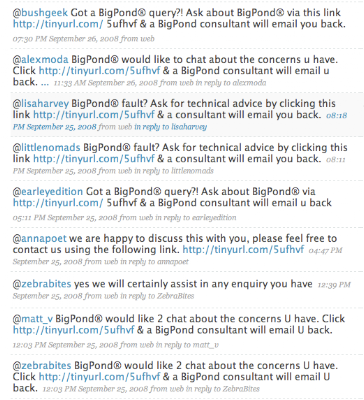 They’ll get better. 🙂 In fact, BigPondTeam are now answering customer service questions in Twitter rather than spamming an email form. Much better. Don’t be too harsh on other newbies.
 - Join in with discussions and so on, games (Sunday Twitter Karaoke is proving to be … excruciating), rituals like the US elections, events like earthquakes, and individual tweets.
- Link to your own blog posts about 1 in 4links. Yes Twitter is an awesome distribution mechanism once you have the numbers, but not if you turn into a spam-bot. The other 3 links (not yours) should be entertaining, informative or humorous.
- Humour. This one will trip the corporates every time. Link to risky sites, link to contentious sites such as http://www.iftheworldcouldvote.com/ – voting in the US elections for the rest of us. If you don’t have humour or an opinion, we won’t find you very interesting. You can only join the discussion if you have something to say – publishing press releases ain’t gonna cut it.
- Figure out who the Leaders are for your interests – if they respond to you a few times, others will see it and you’ll get some followers that add you. But see the point above – if you don’t have humour or something to say, they won’t get into conversation with you. Twinfluence will help you – from @RossDawson via @TrevorCook
- Ask questions – interesting ones – people on Twitter are social and like to help. Making statements sounds like pronouncements and are ignored. Even if you know the answer – or want a good ol’ argument – phrasing as a question lets you start a discussion.
- Let go. Once you get above a hundred or so (ok, ok, 150 if you follow the Dunbar number theory – see wikipedia) you can’t follow everything. Use the DMs and Replies and Summize and hash-tags.
- Hashtags are keywords that you place # in front of. For example when we discuss a conference we are at, we use #wds08 for webdirections 2008 conference. Sometimes it’s hard to figure out the contractions, but it does make it easier to trace a keyword that everyone is using. Summize – or Search – makes the #hashtag a clickable (searchable) keyword)
- Accept that unlike blogs (content) and Facebook (distribution) networks, Twitter is a synchronous (real time) stream. If you go on holidays for a week, when you come back, the conversation has moved on. You’ve got little chance of having the people remember what you were all talking about. Step in, step out, at will. Or as your new Twitter addiction will allow. Heh.
- This is not the medium for personal committed conversations. Oh yes you will have them but remember people have real lives too. If they get up and take the dog for a walk, in the middle of a discussion, don’t take it personally. Don’t expect a reply to your comments and responses. Don’t demand personal attention on direct messages (DMs) – this is a group chat with strangers in a cafe or a bar, not a dinner party with intimates where you can ask for indepth answers. Though sometimes you will be suprised, you can’t expect it.
- Mobile doesn’t work well in Australia – but you can still SMS in your tweets. You just can’t get SMS back. Well there are some services – someone will mention them in the comments (I forget now). Also look at iPhone apps etc. But I wanted this to be about pure Twitter starter’s guide. Not all the resources applications and ecosystem websites and services.

Not sure what else to add, but as my toast (apricot raisin toast) is cooked, you’ll have to figure it out yourselves. Add stuff in comments or on your blog, let me know, and I’ll add/link here. I think the coffee is done too *waves* Oh, and hire people from the TwitterAgency – over 100 Twitter folk who give tips and hints on all things Twitter.
my pet peeve: people who link to their blog, receive nice words about their blog, and then open tweet thanks to the people who complimented the blog. so annoying. i get it. your blog is FANTASTIC.
I wish you had left your Twitter name Anonymous – I wanted to tweet a thank you to you for a great comment on my FANTASTIC blog. *snickers*
Nice one. And so concise – especially compared to this 48-page Introduction to Twitter brochure I found yesterday http://en.calameo.com/read/0000000257624143a2b57.
After all, it’s only 140 characters!!
Great post Laurel – so very true! I’ll be sure to forward this onto twitter newbies that I know 🙂
Hey Laurel, great post, I had to add follow you on Twitter! I’m a bit new but looking to learn more. I found your site via problogger.
I have a Nokia N95 mobile and I use the free FRING client which has builtin twitter client. If you have a data plan in Australia, thats just as good a way to send tweets in 😉
I use ‘tweet60’ as a Twitter app on my N95 – much easier to follow than Fring as it includes ‘avatars’, but you have to manually update.
.-= Allison Miller´s last blog ..theother66: "New on Twitter? Tips and Hints" – thx @SilkCharm – http://snurl.com/qfh29 =-.
If you want to follow all the same people as someone else, or if you want to move from one twitter account to another there is the Serendipity IT Ltd Twitter User Importer here : http://blog.serendipityit.co.nz/2008/10/twitter-user-importer-simple-web-tool.html
Sorry – that link was to our blog post about the twitter user importer tool, this is the link to the actual tool. http://serendipityit.co.nz/twitteruserimporter/
Thanks for the pats on head. My little anxious yet eager face has a smile on it. Very helpful for us newbies.
Hi Laurel – this is a great and concise overview. Problogger done good in introducing an interesting voice to the conversation! I’ll be referring all the “Twitter – what?!” comments to read this post.
Yay! 🙂
I love the little newbies. 😉
Great post!
These tips and hints will help people get the most out of Twitter. Should be compulsory reading for new Tweetors/Tweets-to-be!
As a relative newbie to the twitterverse this post is a perfect snack size guide to the do’s and dont’show. Thanks for encouraging peoples to be nice to us n00bies 🙂
nice overview. What about a glossary of Twitterisms… the @ convention, FTW, RT, etc?
@rebecceforever
I’ve been using Twitter for a couple of months now but I still learnt stuff. Thanks.
Thanks guys 🙂
@rebeccaforever working on it 🙂
Well explained! I wish i read this earlier to help explain to clients.
For a year I have known I should be using Twitter… For the past six months I have used it intermittently. In the past 3 months I have experimented with it specifically… but unsuccessfully in terms of results.
But now armed with some ideas I had not thought off I will give it a serious go.
I am giving a talk to artists interested in social media, and I will be referring them to your blog as a good resource. Thanks, Laurel
Nice post Laurel. I wish I had this when I first started in twitterland.
I came to you via Problogger and I like what I see…
Cheers, Mark
Mark David Moran’s last blog post..Focus or die
I love twitter.
You have depicted the social media profile to trust cycle extremely well.
I write a blog on http://www.searchenginerankings.com.au/seo-blog and would love to get your ideas on how to add punch to my blogginhg!
Great article Lauara.
I’m helping candidate in local Irish elections with his campaign. Do you have any blog, white paper on how new independent candidate to politics can build a profile using new social networking tools?
many thanks
Thanks for the info. Seems to be a lot of rules and hierarchies in place. How did that happen and is that necessarily a good thing I wonder particularly if it stops people simply diving in. If you are polite and have something to contribute does it matter?
wisebuddha’s last blog post..Time for a break
I think Twitter is great way of communication. You described it really well.
Great Post Laurel!!!
Thank you very much for the helpful tips for twitter. I love your site and will keep and eye on your tweets. Now I’m going to look around some more at your site.
Thanks Laurel!!!
.-= Herb Hunter´s last blog ..Top 5 Reasons Why You Should Get Started with a Home Based Business =-.
Laurel, this post gave me a real boost to dive into Twitter.
One of the best things I’ve found since “taking the plunge” is HootSuite (http://hootsuite.com/), which is like TweetDeck in the browser that allows scheduled tweets. It’s a real time saver once it’s configured.
Another site I use is TweetLater (now called SocialOomph), which allows automatic DMs to followers, scheduled tweets and follower vetting.
With these great twitter tips I should be able to improve my business.
Wise words for all of us – not just beginners – thanks
The perfectly patronising tone of your opening sentence is most appropriate.
.-= Paul´s last blog ..different senses, different shoes =-.
Thankyou I try 😛
Great post. Love the details about ‘What is Twitter”.
These posts never get old to me though I’ve written my own as well. Folks new to Twitter need this sort of kick start and those that think they’re experts need it as well.
Hi Laurel,
I saw your presentation at the PCO conference today and was blown away. I am working with team members currently to write a social media strategy and have so much to take back to them now, your blog included. Thanks so much!
Hey Laurel,
Enjoyed this post very much. I’ve bookmarked it so that I can share it with my friends who are new to Twitter. Very useful information. I am taking a graduate class on Emerging Media and the Market this Spring and I have an idea that this post will be a great reference for my class. I look forward to reading more and following your tweets.
Have a Good Day!
Kevin
Hello Laurel,
For the first time i am here. Nice to see your blog and post all appreciated. 🙂
Nice post for us n00bs. 😉 I’ve been on the web long enough that I didn’t find Twitter too confusing, but I had to look up the hashmarks to get them fully. I still forget to use them, but it makes sense to add them when you’re talking about a subject, but don’t actually use subject-name in your meager 140 characters. You still want to show up on Twitterfall or whatever for searches on that topic (if you want to be found anyway). 🙂
Wow a lot and once complete .. very fantastic and perfect explanation, I’ll try it
Great blog! Thanks for sharing.
I love the article. The graphics totally ROCK!
So happy to meet you on Twitter and be a new fan of your Facebook page. 🙂
I love technology, social media and marketing.
I thought your readers would enjoy these two articles I wrote on my Twitter blog.
http://twitterfornewbies.com/75/10-tips-how-to-twitter/
http://twitterfornewbies.com/33/twitter-tip-7-steps-to-get-people-to-follow-you-on-twitter/
See you on Twitter,
@ClayFranklin
great post about twitter, you explained it really well
though there’s even more to twitter than just that, but you got the basics
with this knowledge you share everyone can tweet purrrfectly
Twitter has been one of the most famous social networking sites wherein everybody can reach one another even they live in different places. Enumerated above are useful tips on how we can actually maximize the use of our twitter account.
I’ve read that twitter growth slows down. Twitter must add something to their feature to be able to compete to other social networking sites, most importantly Facebook. All of the tips and hints help us to use Twitter more wisely.
Dear Sir/Madam,
My Name Is Rashmi Ranjan Behera (Managing Partner – http://www.websitepromotioner.com). We are handling offshore clients and providing them low cost link building services, organic SEO, Social Bookmaking, Directory and Article submission, web designing & web development services etc…..
We are providing services to our world wide clients before 5 years and having proven track record and are quite capable of ranking sites higher in search engines.
OUR LINK BUILDING TEAM:
15 Link Building Specialist (Minimum 2 years of working experience)
5 Directory Submission Specialist (Minimum 1 years of working experience)
6 Article Submission & Article Writing Specialist (Minimum 3 years of working experience)
6 Social Book Marking and Blog Posting Specialist (Minimum 2 years of working experience)
OUR WEB SITE DESIGN TEAM:
4 Web Designers (Above 5 years of working experience)
OUR WEB DEVELOPMENT TEAM:
2 ASP.Net Specialist (Having more then 4 Years of working Experience)
2 PHP Specialist (Having more then 3 Years of working Experience)
Payment & Billing Method:
We are not accepting any Upfront/down payments from our clients Due to your security reason. You will get work updates for your all projects weekly with weekly Invoice. You need to pay after getting weekly Updates. Our Reporting Time is every Saturday. We accept Payments via PayPal, Bank Wire Transfer and Credit Card ETC…
Client Security:
You have 100% Authority to reject any links and we never demand any payment for rejection. You will get full refund if you will not get work complete IN TIME. If Rejection will above 15% (With Proper Reason) You will get a special Discount against total money. We will follow your Criteria 100% while working for your project.
Kindly Feel Free to Let me know if you need more information.
Look forward a relation with you.
Regards
Rashmi Ranjan Behera
Twitter is the Number 1 social networking site.. now a day out of 10 people 9 are using twitter.. with twitter news are spreding in a micro seconds.. i like twitter very mcuh
I struggled a lot while sing twitter before.. after i reading this blog i understand aboutn twitter.. thank you very mcuh for a nice posting about twitter.
although I am not too much into twitter,but its few nice tips to get the users interested
I have definitely ended up inside of promoting and advertising for a a long time but my own associate continues suggesting to all of us that our staff members really should experiment with (blank) voice broadcasting in the role of a method to produce prospects. I actually really believe this tough to acknowledge the fact it honestly works. Everytime When i get 1 of these calls I really primarily hang up the phone immediately but he claims of the fact that it comes with a incredibly less expensive method to acquire qualified prospects. I i’m nonetheless on the fence however I realize that the other models our company is making use of tend to be simply growing to be much more (blank) expensive.
Tips on how to use Twitter (for newbies) http://ff.im/-AZHf8
Just do me a favor and keep writing such trenchant ayanlses, OK?
Tips on how to use Twitter (for newbies) http://ff.im/-AZW8m
RT @TopsyRT: New on Twitter? Tips and Hints | Laurel Papworth | @SilkCharm http://bit.ly/dFAVFa
.@silkcharm thanks for follow & for yr good tips here http://ow.ly/4IKzd
New on Twitter? Tips and Hints | @SilkCharm | Laurel Papworth http://bit.ly/dFAVFa
And another great read, more tips, this time from an Australian:
http://j.mp/14FqSb
New on Twitter? Tips and Hints | @SilkCharm | Laurel Papworth http://goo.gl/fb/QEsib #twitter #hints #socialmedia
New on Twitter? Tips and Hints http://bit.ly/1BUfkM
Haha love your quote, if your not humerous or have an opinion, we don’t want to listen to you! It’s so true! Twitter is quickly becoming an effective source of marketing in Australia.
interesting #twitter tips and advice at http://t.co/whq1uBq @silkcharm
twitter is really a great tool. i just love twitting..
.@robtcardoza this link is a good read. -> New to Twitter? Tips and Hints by @SilkCharm http://goo.gl/3f2n //
Still a good resource for those new to twitter: http://t.co/yVIY1g4 via @SilkCharm
Still a good resource for those new to twitter: http://t.co/yVIY1g4 via @SilkCharm
New on Twitter? Tips and Hints http://bit.ly/1BUfkM
If you're new to twitter this guide will get you up to speed. Old but good. http://j.mp/nVTQWV via @SilkCharm
I was shocked. This is such a sensible post. No wait, I mean I wasn’t shocked that *you* wrote such a sensible post, I was shocked that I stumbled upon such a sensible post. I mean, not that I *should* be shocked – I probably shouldn’t – but that it was there, and there *is* intelligent life in the twitterverse/blogosphere.
Sigh. Maybe I should start over.
Deep breath. There is so much self-serving crap out there about how to get rich in 20 minutes using only Twitter, a toothpick and a pair of maracas that when I stumbled across your blog I was really surprised.
And shocked, even, as I said. I was trying to figure out who you are because you’d said something really worthwhile on Twitter and I was trying to decide if I should follow you and your Twitter bio had your web URL in it so I clicked on it – but none of that’s important right now.
What I am actually trying to say is that this piece is brilliant, and even an “old” tweep like me learned some sage advice. So thanks. I’m sending this to all the twitter n00bs I know. (Actually, only two.)
@SilkCharm … very nice link http://t.co/HBIcuNb
Some great tips and advice on using Twitter – RT @Silkcharm: New on Twitter? Tips and Hints http://t.co/Pz5aHk6
Twitter Is A Place For Testimonials http://t.co/4v4OqYD
New on Twitter? Tips and Hints http://t.co/9EMPy3b
Excellent Introduction for those New on Twitter? | @SilkCharm | Laurel Papworth – http://t.co/CyqGXex
Excellent Introduction for those New on Twitter? | @SilkCharm – http://t.co/Uy3L2FP
Excellent Introduction for those New on Twitter? | @SilkCharm – http://t.co/CyqGXex
Excellent Introduction for those New on Twitter? | @SilkCharm | Laurel Papworth – http://t.co/MUXn5PX
Excellent Introduction for those New on Twitter? | @SilkCharm | Laurel Papworth – http://t.co/hdd6YCt
Excellent Introduction for those New on Twitter? | by @SilkCharm – http://t.co/CyqGXex
An Excellent Introduction for those New to Twitter? | by @SilkCharm – http://t.co/hdd6YCt
New on Twitter? Tips and Hints | @SilkCharm | Laurel Papworth http://t.co/PRo3pUA
New on Twitter? Tips and Hints | @SilkCharm | Laurel Papworth http://t.co/PRo3pUA
RT @TMorais: New on Twitter? Tips and Hints | @SilkCharm | Laurel Papworth http://t.co/t9mB1AN: RT @TMorais: New… http://t.co/YRQdFla
Thx @SilkCharm for the follow Goddess of the social media workshop.http://t.co/R91S2vh Swap links w/ me? http://t.co/bfEvGdY Cheers, Pete
RT @TopsyRT: New on Twitter? Tips and Hints | @SilkCharm | Laurel Papworth http://t.co/9Kk7eUu
Great Introduction for those New on Twitter? | by @SilkCharm – http://t.co/hdd6YCt
New on Twitter? Tips and Hints http://t.co/6yEFOzx
Thanks for the Twitter ‘How To’ guide. Been Tweeting as Good2Go a short while and still not really got to grips with etiquette. This is very helpful.
To all the new peeps on Twitter u should check this article by @silkcharm best article on Twitter etiquette ever: http://t.co/KRNGwJDD
To all the new peeps on Twitter u should check this article by @silkcharm best article on Twitter etiquette ever: http://t.co/KRNGwJDD
To all the new peeps on Twitter u should check this article by @silkcharm best article on Twitter etiquette ever: http://t.co/KRNGwJDD
To all the new peeps on Twitter u should check this article by @silkcharm best article on Twitter etiquette ever: http://t.co/KRNGwJDD
To all the new peeps on Twitter u should check this article by @silkcharm best article on Twitter etiquette ever: http://t.co/KRNGwJDD
To all the new peeps on Twitter u should check this article by @silkcharm best article on Twitter etiquette ever: http://t.co/KRNGwJDD
@SilkCharm that was a wonderful tweet! 🙂 http://t.co/obx4rQpD
New on Twitter? Tips and Hints http://t.co/V9IVZfba great sumry of what twitter is about. Thank you @silkcharm and @colvinus for the retweet
To all the new peeps on Twitter u should check this article by @silkcharm best article on Twitter etiquette ever: http://t.co/KRNGwJDD
To all the new peeps on Twitter u should check this article by @silkcharm best article on Twitter etiquette ever: http://t.co/KRNGwJDD
To all the new peeps on Twitter u should check this article by @silkcharm best article on Twitter etiquette ever: http://t.co/KRNGwJDD
You're not an 'automated bot' are you @abcnews http://t.co/7PattPn7 ?
@silkcharm claims you are!
To all the new peeps on Twitter u should check this article by @silkcharm best article on Twitter etiquette ever: http://t.co/KRNGwJDD
@hillcite some tips for people new on Twitter http://t.co/rh4upqOs
To all the new peeps on Twitter u should check this article by @silkcharm best article on Twitter etiquette ever: http://t.co/KRNGwJDD
To all the new peeps on Twitter u should check this article by @silkcharm best article on Twitter etiquette ever: http://t.co/KRNGwJDD
To all the new peeps on Twitter u should check this article by @silkcharm best article on Twitter etiquette ever: http://t.co/KRNGwJDD
To all the new peeps on Twitter u should check this article by @silkcharm best article on Twitter etiquette ever: http://t.co/KRNGwJDD
To all the new peeps on Twitter u should check this article by @silkcharm best article on Twitter etiquette ever: http://t.co/KRNGwJDD
RT @TopsyRT: New on Twitter? Tips and Hints | @SilkCharm | Laurel Papworth http://t.co/j8u0OVar
To all the new peeps on Twitter u should check this article by @silkcharm best article on Twitter etiquette ever: http://t.co/KRNGwJDD
I must admit I have been on Twitter for awhile (2009) and I couldn’t seem to ‘work’ with it properly. Thank you so much for this article, I feel helped. I also book marked this page. Just to let you know.
@SilkCharm making use of your tips! New on Twitter? Tips and Hints here http://t.co/aEB7QxFK
Hi Laurel,
It would be great if you could update this article to reflect that http://twitter.com/abcnews is not an ‘automated bot’.
It’s true that the account was set up as a bot but we quickly saw that bots were not best practice on Twitter and so moved away from that.
Our approach to social media is to make it an integral part of what we do, rather than an optional extra. The people who send tweets from the @abcnews account are the same people producing the main bulletins on the ABC News website.
I’d say the account hasn’t been a bot for about two years, maybe longer.
Thanks,
Gary Kemble
ABC News
Hi Gary, I rarely edit posts that are more than a day old. It gets confusing and I would be updating all the time. I trust people to look at the published date.
Incidentally I don’t want personalised broadcast breaking News – I want automated fast breaking news. And the thought of someone tweeting what they had for lunch inbetween announcements of Tsunamis and bombings is horrendous. So it’s really not a big deal whether there’s automation there or not in the case of the ABC. We’ll leave it stand. 🙂
Hi Laurel,
Thanks for the response.
It’s your blog so it’s your call! 🙂 Obviously, you can’t spend all your time editing posts but, given you link to this one from your Twitter profile, it might be worth doing. You can
cross it outuse strikethrough so people can see the change.Unfortunately, there’s no such thing as ‘automated fast breaking news’ on Twitter. Automated Twitter accounts generally rely on RSS feeds and on a system to check the RSS feed for updates. This can mean a delay of half an hour or more between when the news story is posted and when the tweet is sent.
I totally agree that tone is vital. You can have human tweeting without being overly personal or, as you say, tweeting about your lunch.
Thanks,
Gary
http://laurelpapworth.com/new-on-twitter-tips-and-hints/
To all the new peeps on Twitter u should check this article by @silkcharm best article on Twitter etiquette ever: http://t.co/KRNGwJDD
Excellent Introduction for those New on Twitter? | @SilkCharm | Laurel Papworth – http://t.co/UGUbNtst
New on Twitter? u should check this article by @silkcharm best article on Twitter etiquette ever: http://t.co/u8EI8A0K RT @TylerWardsBored:
New on Twitter? Tips and Hints | @SilkCharm | Laurel Papworth – http://goo.gl/3f2n
New on Twitter? Tips and Hints | @SilkCharm | Laurel Papworth – http://goo.gl/3f2n
Excellent Introduction for those New on Twitter? | @SilkCharm | Laurel Papworth – http://t.co/UGUbNtst
RT @intmf Excellent Introduction for those New on Twitter? | @SilkCharm | Laurel Papworth – http://t.co/qrK5DadS
New on Twitter? Tips and Hints http://t.co/rzBlPB6u
Once again, @SilkCharm 's Twitter Hints & Tips is invaluable: http://t.co/1eqMdIDy
Good stuff via @YogaReach: Once again @SilkCharm's Twitter Hints & Tips are invaluable: http://t.co/C6xxwBJJ
@SilkCharm It's a great resource: http://t.co/O0i3Fx28
New on Twitter? Tips and Hints | @SilkCharm | Laurel Papworth http://t.co/mkqPXV5H
@cristinacost Yes, Cris A very interesting slide made by @SilkCharm . Check the original post http://t.co/ch63qxkn
RT @pgsimoes: @cristinacost Yes, Cris A very interesting slide made by @SilkCharm . Check the original post http://t.co/RPWRmT7A
New on Twitter? Tips and Hints – blogpost by @SilkCharm via @pgsimoes http://t.co/75TSoXgz #WResearcher #mscsm
New on Twitter? Tips and Hints – blogpost by @SilkCharm via @pgsimoes http://t.co/75TSoXgz #WResearcher #mscsm
RT @pgsimoes: @cristinacost Yes, Cris A very interesting slide made by @SilkCharm . Check the original post http://t.co/emThsEof
RT @pgsimoes: @cristinacost Yes, Cris A very interesting slide made by @SilkCharm . Check the original post http://t.co/RPWRmT7A
New on Twitter? Tips and Hints – blogpost by @SilkCharm via @pgsimoes http://t.co/75TSoXgz #WResearcher #mscsm
RT @cristinacost: New on Twitter? Tips and Hints – blogpost by @SilkCharm via @pgsimoes http://t.co/g1Z20BrD #… http://t.co/zZPbBvJA
Hi Laurel,
great post – full of great ideas. I will be using it in my future workshops.
I am especially happy to have access to your social web reputation management diagram. is there any other literature you have written about it. really interesting, thanks for sharing
RT @TopsyRT: New on Twitter? Tips and Hints | @SilkCharm | Laurel Papworth http://t.co/qwEQ1BlC
http://t.co/cEOQN86C Social Web – Reputation Management Cycles #infograph
http://t.co/wG11TriA Social Web – Reputation Management Cycles #infograph
@SilkCharm Thanks for the follow & really liked your article for new people on #twitter http://t.co/15FFVvpc
is having a look at the site @SilkCharm http://t.co/6FrKXrsg in brief what Twitter is: place for Testimonials, distribution and conversation
@SilkCharm Community Manager, Goddess of the social media workshop,laurel@laurelpapworth.com 0432684992 Australia, Asia http://t.co/QTFne3c8
Writing part of #mpstory seminar breakdown and found these tips and tricks for Twitter users by @SilkCharm http://t.co/kqux4W8j
Writing part 2 of #mpstory seminar breakdown and found these tips and tricks for Twitter users by @SilkCharm http://t.co/kqux4W8j
Great tips for {newish} Twitterers from @silkcharm http://t.co/nFF1CTau
#VicPLN Laurel Papworth excellent person to follow RT @antheafoyer: Great tips for {newish} Twitterers from @silkcharm http://t.co/8WRVl7u6
New on Twitter? Tips and Hints http://t.co/6pTKQtdd
Interesting read via @SilkCharm: http://t.co/xhjsxfDS
@ervinse čau! Ja,patīk twiterot vari iečekot šos tipus.Pats gan visus neievēroju,jo tad ir garlaicīgi http://t.co/YuwHZyFc
Hi @shaynecollier check out this article http://t.co/8lgeQRgQ by @SilkCharm I hope it helps you on your Twitter journey 🙂
New on Twitter? Tips and Hints: http://t.co/vTVQYbEP Great pointers for those new to Twitter from Laurel Papworth @SilkCharm
This is a great article – really outlines how to maximize your potential using Twitter.
Thank you Laurel, great work.
New on Twitter? Tips and Hints: http://t.co/rJWjhv1o
Hahahahahahahahahahahahaha What the fuck is this. http://t.co/iBF4vYBx
To all the new peeps on Twitter u should check this article by @silkcharm best article on Twitter etiquette ever: http://t.co/KRNGwJDD
Thank you for the follow @SilkCharm also for the very useful tips on your website! Always, appreciated. http://t.co/C6pMCORU
New on Twitter? Tips and Hints: http://t.co/fvI9AQgp > great stuff by @SilkCharm
@sxngman here's an usefull link for you – even if u're not a noob, u act like one http://t.co/9IdRHPft
New on Twitter? Tips and Hints | Laurel Papworth- Social Network Strategy http://t.co/Tx6TT4Xg #socmed
#Aussiepride @SilkCharm is a #socialmedia keynote speaker, trainer & mentor. We love her #downunder http://t.co/IvUB2AQW
@SilkCharm Hai Silkcharm, I read your article in http://t.co/DjUsxaZR . Its very nice.
I’m new to twitter and was browsing around for some tips about twitter. Some of these are pretty good. Thanks For Your post, was added to my bookmarks.
this is fantastic advice, thanks!!
Can’t even believe how good this was and straight on the money. My twitter account has been plagued with spam and now I also feel the need to do way less advertisement and way more communication. Thank you so much! If there is anyone interested in chatting some say hello @sweetgirlbandb
hi Laurel, is it ethical to be still promoting your “top 50 Forbes social medial influencer” billing when that was 2012 and doesnt look like you made the cut this year… isnt the power of social being up to date.
Thanks for the tips. Feels like there are so many…
Hi Laurel – great Twitter guide – thanks. Also where do you get apricot and raisin toast? I’ve never heard of it but it sounds very yummy.